
Form 8621 Calculator – DIY Calculation Workflow
(Step-by-Step CSV → Mapping → Output for PFIC §1291 / §1296)
Quick Start Workflow
This practical guide walks you through preparing your transaction CSV, confirming column and category mapping, and generating completed Form 8621 deliverables.
Technical Boundaries: For computation assumptions, multi-currency support, and excluded scenarios, see Scope & Assumptions.

This video demonstrates the Form 8621 calculator quick-start workflow, including CSV preparation, transaction mapping, and Excel output review.
Video: PFIC §1291 Calculation Workflow
0 Prerequisites
Before uploading your data, ensure you have the following information ready:
- Identified Regime: You know which calculation method applies (§1291 excess distribution default or §1296 MTM).
- Complete Transaction Records: All acquisition lots, dates, units, and original purchase costs are documented.
- Distribution Records: All cash dividends, reinvestments, and return-of-capital distributions are recorded.
1 Prepare Transaction CSV Data
The CSV file is the only input required for the calculation. It must contain your complete transaction history.
Required CSV Columns
Column names must match exactly:
- Date: Transaction date (YYYY-MM-DD format)
- Details: Description (e.g., "Purchase", "Sale", "Distribution")
- Units: Number of shares/units
- Value: Transaction amount in original currency
Example CSV Format
| Date | Details | Units | Value |
|---|---|---|---|
| 2020-03-05 | Purchase | 1000 | 5000.00 |
| 2021-06-15 | Distribution | 0 | 200.00 |
| 2022-05-10 | Sale | -200 | -1200.00 |
📈 1296 MTM: CSV Preparation & FMV Row Rules
Section 1296 Mark-to-Market (MTM) calculations require annual Fair Market Value (FMV) inputs in addition to transactions. Follow these specific rules:
| Date | Details | Units | Value |
|---|---|---|---|
| 2020-03-05 | Contribution | 10000 | 15000 |
| 2021-05-15 | Sold | -12.433 | -29.68 |
| 2022-03-12 | Reinvestment | 19.08384 | 22.83 |
| 2023-12-31 | fmv | 10068.813 | 20018.53 |
| 2024-12-31 | fmv | 10068.813 | 17079.56 |
Additional rules for MTM:
- MTM calculations require at least one FMV row for each tax year — from the first MTM year through the filing tax year.
- FMV rows must appear at the end of the transaction list, one row per calendar year (typically Dec 31).
- The Details field must be exactly: fmv (lowercase).
- Each FMV row must include total units held at year-end and year-end FMV in original currency.
- Date must be
YYYY-MM-DD - Sales/Dispositions use negative Units. Value may be entered as either positive or negative; its sign does not affect the calculation.
- Empty cells are not allowed. Use 0 only when the economic amount is truly zero.
- One PFIC = One CSV (full history required)
💡 Guidance: Forcing Excel to ISO Date (YYYY-MM-DD)
Excel often auto-converts dates when saving CSV files. To ensure compliance:
- Select the Date column in Excel.
- Right-click → Format Cells.
- Choose Custom and type:
yyyy-mm-dd - Save as CSV UTF-8 (Comma delimited).
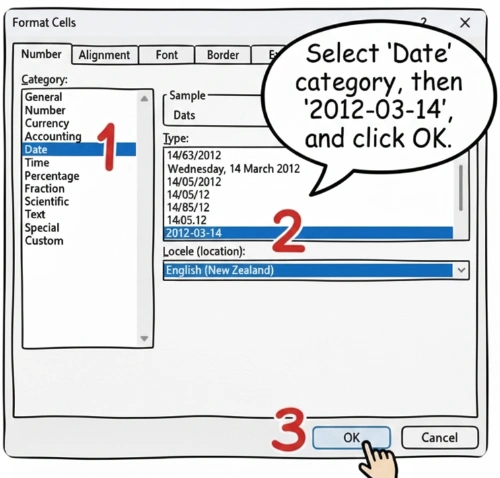
YYYY-MM-DD format before uploading. Recommended: Set Date column format explicitly in Excel before saving as UTF-8 CSV.
Currency Handling
Enter amounts in the original currency. Do not pre-convert to USD. The calculator will handle FX conversion automatically using daily spot rates.
2 Upload CSV File
The workflow begins with uploading your prepared CSV file to the calculator.
- Navigate to the Homepage
- Click the file upload area or drag-and-drop your CSV file
- The system will validate the file format and column structure
3 Transaction Type Mapping (Most Critical Step)
The system performs mechanical computations based strictly on user-confirmed inputs and classifications. Every transaction must be manually confirmed. Mapping informs the FIFO logic and excess distribution calculations.
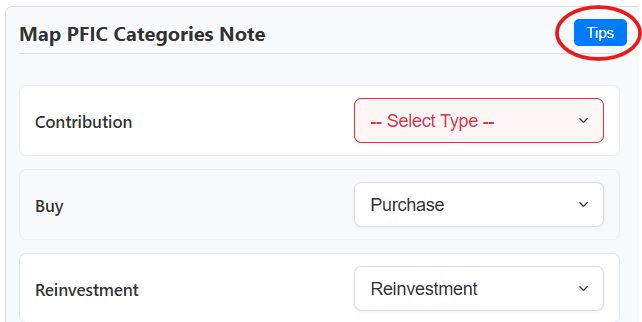
Quick Decision Logic
| Units | Value | Description (what it says on the statement) | Type |
|---|---|---|---|
| > 0 | > 0 | Buy / Purchase / Subscription / Contribution | Purchase |
| > 0 | > 0 | DRIP / Reinvest / Reinvestment / Dividend reinvested | Reinvestment |
| < 0 | Any | Sell / Sale / Redemption / Switch-out | Sale |
| = 0 | > 0 | Dividend / Distribution / Interest | Distribution |
| = 0 | Any | ROC / Return of Capital | Return of Capital |
| = 0 | Any | Basis adjustment (e.g. prior-year QEF / MTM adjustment) | Cost Base Adjustment |
| Any | Any | Fees / Charges / NAV adjustment / Internal fund tax | Ignore |
💡 Guidance: When to use "Ignore" vs. "Purchase/Sale"
Use "Ignore" for: Internal transfers within the same fund, NAV adjustments that don't change your share count, and metadata rows.
NEVER "Ignore": Any event that changes your legal ownership or constitutes a taxable distribution.
4 Configure Parameters
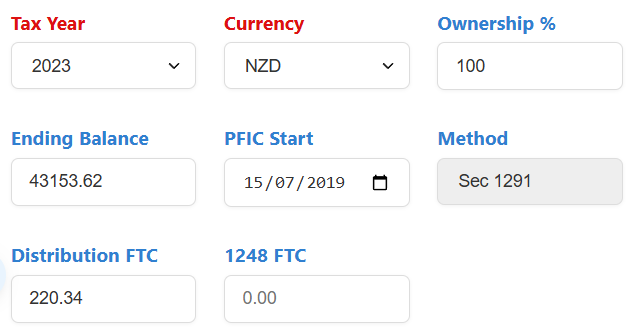
Required Parameters
- Tax Year: The reporting year (e.g., 2024).
- Currency: Original currency used in your CSV (e.g., NZD, AUD, EUR).
- Ownership %: 100% for individuals.
- PFIC Start Year: Year you became a U.S. resident after purchase.
5 Run PFIC Calculation
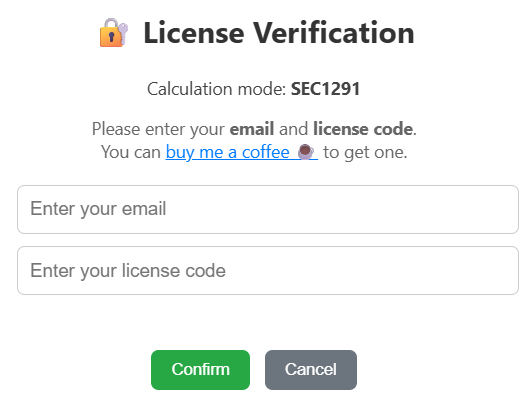
Click "Run PFIC Calculation" button. Enter your email and license code. The system performs mechanical computations: FIFO lot matching, excess distribution identification, and interest math.
6 Download Results & Form 8621 PDF Deliverables
Retrieve the ⬇ Download Results (.zip) package immediately upon completion. Results are not stored on our servers and cannot be retrieved after page refresh.
Output Deliverables Package
- Filled Official Form 8621 PDF: Ready-to-file IRS Form 8621 with all relevant Part I, Part II, Part V, or Part VI fields filled out.
- Line 16a Continuation Statement PDF: Mandatory statutory attachment explaining §1291 excess distributions, 3-year historical distribution testing (Line 15b–15e), and year-by-year deferred tax & interest allocations (Line 16c–16f).
- Excel Audit Workpapers (.xlsx): Comprehensive FIFO lot tracking, foreign exchange conversions (daily FX), and §6621 quarterly compounded interest audit trail.
- CCH Axcess™ Integration Files: Pre-formatted worksheets for instant tax software import.
Sample Workpapers & Form 8621 PDF Deliverables
Review the sample deliverables below to inspect the mathematical traceability in the Excel workpapers and verify the IRS-compliant formatting of our generated Form 8621 and Line 16a continuation statements.
Section 1291 (Default Method)
Excess Dist. & Tax/InterestIncludes filled Form 8621, statutory Line 16a explanation statements, CCH import sheets, and complete FIFO audit workpapers.
📦 Download §1291 Complete Package (.zip)Section 1296 (Mark-to-Market)
Part VI Ordinary Gain/LossIncludes filled Form 8621 for MTM, Part VI year-end statement, CCH election & sales schedules, and MTM workpapers.
📦 Download §1296 MTM Complete Package (.zip)