
How to File Form 8621 with TurboTax: DIY PFIC Paper Filing Guide
Updated: Sep 2026 · Category: DIY Tax Filing & Software Integration
If you prepare your taxes with TurboTax (or TaxAct, H&R Block, FreeTaxUSA) and hold foreign mutual funds or ETFs (PFICs), you can successfully complete your filing using the IRS paper filing method. This practical guide walks you through reporting calculated Form 8621 figures on Form 1040, attaching required continuation statements, and assembling your mail-in return.
1. How to File Form 8621 with TurboTax via Paper Filing
You can file Form 8621 alongside your TurboTax return using IRS paper filing. While TurboTax manages your Form 1040 and standard income schedules, it does not calculate PFIC §1291 excess distributions or generate Form 8621. By preparing your Form 8621 package separately, transferring the calculated figures into TurboTax, and selecting "File by Mail", DIY taxpayers can accurately submit complete, IRS-compliant returns.
1. Run your transactions on 8621calculator.com to generate your pre-filled Form 8621 PDF bundle and workpapers.
2. Transfer the summary income, tax, and interest amounts into your TurboTax return.
3. In TurboTax, select File by Mail (Print and Paper File).
4. Collate the printed Form 1040 packet with the generated Form 8621 PDF and mail it to the IRS.
Sample Form 8621 Files & Complete Package
Preview the sample pre-filled PDF outputs directly in your browser, or download the complete calculation package to follow along with the steps below:
2. How to Report Form 8621 in TurboTax (Form 1040 Flow Matrix)
Open your master calculation workpaper: *****_Pfic_1291.xlsx (e.g. 2023_Pfic_1291.xlsx, or *****_Pfic_MTM.xlsx for Mark-to-Market).
Ignore all CCH-specific tabs. Focus on the Green Tabs:
Potential green tabs:
[1040], [Sch_1], [Sch_2], [Sch_B], [Sch_D], [8949], [1116].• Tab present: That schedule is RELEVANT to your return.
• Tab absent: That schedule is NOT RELEVANT for this fund and tax year.
Form 8621 to Form 1040 Entry Matrix
Per the IRS Form 8621 Instructions (Rev. December 2025), transfer amounts to your individual tax return as follows:
| Form 8621 Line | Tax Character | Form 1040 Location | TurboTax Input Instructions |
|---|---|---|---|
| Line 16b | Pre-PFIC & Current-Year Ordinary Income | Schedule 1, Line 8z (Other Income) |
Under Wages & Income > Less Common Income > Miscellaneous Income > Other reportable income, enter the amount and write description: Form 8621. |
| Line 16e | Net Additional Tax (after FTC) | Form 1040, Line 16, Box 3 | Include this tax in total tax on Form 1040 Line 16. Check box 3 and enter 1291TAX. |
| Line 16f | Section 6621 Daily-Compounded Interest | Schedule 2, Line 17p (Other Taxes) |
Under Deductions & Credits > Other Taxes, enter the interest charge and write description: Sec. 1291 interest. |
| Nonexcess portion (Lesser of Line 15a or 15d) |
Dividend income to extent of §301(c)(1) E&P | Form 1040, Line 3b (and Schedule B Line 5) |
If applicable per green tab [Sch_B], report as ordinary foreign dividend income. |
Note: Line 16c reflects the prior-year aggregate increase in tax before credits (it is a tax computation component, not taxable income).
3. Pre-Filing Checklist: Filling Form 8621 PDF Placeholders
To protect taxpayer privacy, 8621calculator.com does not collect Social Security Numbers or street addresses. All mathematical lines are pre-computed, but identifying fields in the header contain bracketed placeholders.
![IRS Form 8621 header showing [FILL/REPLACE: ...] and [FILL: ...] placeholder fields](../../assets/img/docs/form-8621-header-fill-placeholders.webp)
Open Form_8621_TY202X-XXXXX.pdf in Adobe Acrobat Reader, Google Chrome, Microsoft Edge, or Apple Preview. Every field starting with [FILL must be completed:
[FILL/REPLACE: SHAREHOLDER NAME]→ Legal name matching Form 1040 line 1.[FILL/REPLACE: SSN/ITIN]→ Social Security Number or ITIN.[FILL/REPLACE: STREET ADDRESS]→ Residential street address.[FILL/REPLACE: CITY]→ City or town.[FILL: STATE]→ State or province.[FILL: COUNTRY]→ Country of residence.[FILL: ZIP]→ ZIP or foreign postal code.[FILL/REPLACE: PFIC NAME]→ Legal name of the foreign company or fund.[FILL/REPLACE: PFIC ADDRESS]→ Foreign corporate address.[FILL/REPLACE: EIN/REF ID]→ Foreign Entity Reference ID Number (see rules below).
4. Form 8621 Reference ID Number for Foreign Funds
Foreign ETFs and mutual funds almost never possess a U.S. EIN. Per official IRS instructions, enter a Reference ID number in the entity information block above Part I.
IRS Numbering Rules
- Must be alphanumeric ONLY (letters and numbers, up to 50 characters).
- No spaces or special characters: Hyphens (
-), slashes (/), and symbols (#,@) are not permitted. - Valid Formats:
PFICVAS001,VANAU001,REF862101.
Use the same Reference ID consistently from year to year for the same PFIC. Do not reuse an old Reference ID for a different PFIC.
5. Line 16a Continuation Statements: Practical Guidance
IRS Form 8621 Line 16a requires attaching a statement showing the holding period for each block of stock, the allocation of excess distributions or gains to each day in the holding period, and the aggregate amounts for each prior tax year.
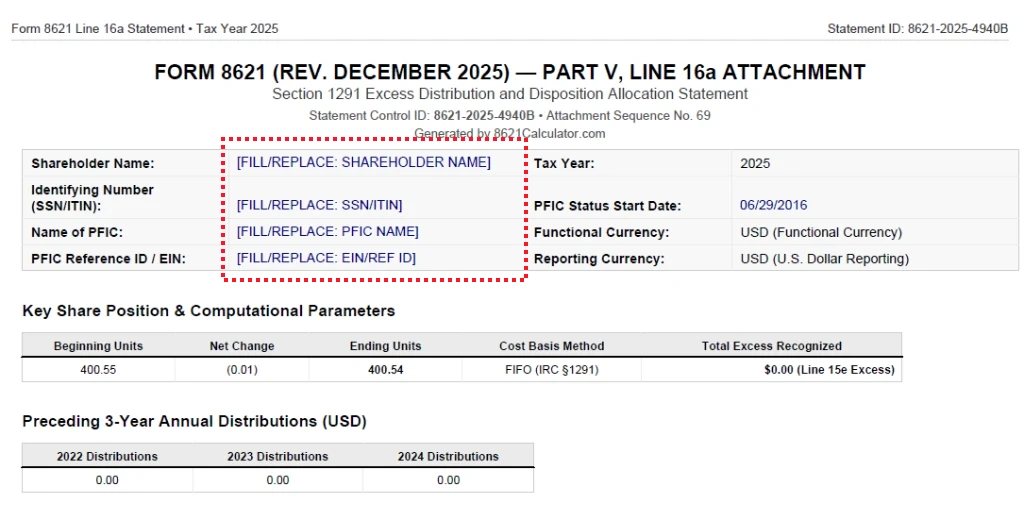
Condensed Statement vs. Full Workpaper
| Document | Scope & Content | Filing Application |
|---|---|---|
Condensed StatementForm_8621_Line_16a_Statement_Condensed_*.pdf |
Consolidated statutory holding-period and excess allocation schedule containing all information required by Line 16a. | Filed Attachment: Designed to serve as the filed Line 16a continuation statement stapled to Form 8621. |
Full Statement / WorkpaperForm_8621_Line_16a_Statement_*.pdf |
Lot-by-lot, transaction-by-transaction holding period allocations and daily calculations. | Audit Support: Detailed computational workpaper retained with the taxpayer's permanent records. |
If the full transaction-level workpaper is very long (common with frequent dividend reinvestments), the calculator provides a condensed Line 16a statement designed to present the required holding-period allocations more efficiently. Attach the Condensed Statement to your paper-filed Form 8621 and retain the detailed workpaper with your records.
6. How to Assemble and Mail Your Form 8621 Paper Return
When organizing a paper return, follow the attachment sequence printed on the version of Form 8621 you are filing (the December 2025 revision shows Attachment Sequence No. 621).
Collation Sequence (Top to Bottom)
- Form 1040 (Pages 1 & 2): Printed from TurboTax. Must be signed and dated in ink on Page 2!
- Withholding Forms (W-2 / 1099): Stapled to the front of Form 1040 where indicated.
- Form 1040 Schedules: Schedule 1, Schedule 2, Schedule 3, Schedule B, Schedule D.
- Other Numerical IRS Forms: Form 8949, Form 1116 (if applicable).
- Form 8621: Completed form (Attachment Sequence No. 621).
- Line 16a Statement: Condensed Statement (or full statement) attached directly behind Form 8621.
- Sign in ink: The IRS will reject any paper return lacking an original ink signature.
- Send via USPS Certified Mail: Mail your packet via USPS Certified Mail with Return Receipt. Under IRC §7502, the postmark date is legal proof of timely filing.
- Verify IRS Address: Confirm the IRS submission center address for your state or country in the Form 1040 instructions (addresses differ for returns with vs. without payments).
- Keep a complete copy: Retain an identical copy of everything mailed, along with your USPS tracking receipt.
7. What About Drake Tax? (Form 8621 Part V Limitation)
Drake Tax supports Form 8621 Parts I–IV through the Foreign tab > 8621 screen. However, Drake currently does not support Part V of Form 8621 for e-filing. Part V is available under Tools > Blank Forms and must be completed manually when needed.
For Section 1291 PFIC calculations, 8621calculator.com generates the pre-filled Form 8621 figures and statutory Line 16a continuation statement. Preparers can use the generated amounts to complete the applicable Drake entries and manually complete Part V where required.
Note: Drake supports preparer PDF attachments through its PDF attachment workflow, but whether a specific Form 8621 supporting statement can be transmitted with a given return depends on applicable e-file rules and Drake's form support.
8. FAQ: TurboTax, Drake & DIY Filing
Can TurboTax file Form 8621?
TurboTax does not currently support Form 8621. For tax year 2025 and 2026, TurboTax users who need to include Form 8621 generally need to prepare the form separately and paper-file the completed return by mail.
Does TurboTax support PFIC reporting?
No. TurboTax cannot compute Section 1291 excess distributions, 3-year historical average thresholds, or Section 6621 interest charges. DIY investors use 8621 Calculator to generate the required tax figures and pre-filled PDF packages.
Where do I enter Form 8621 amounts in TurboTax?
Report Line 16b ordinary income on Schedule 1 Line 8z (write "Form 8621"). Include Line 16e net additional tax on Form 1040 Line 16, Box 3 (write "1291TAX"). Report Line 16f interest on Schedule 2 Line 17p (write "Sec. 1291 interest").
Can I file Form 8621 with TaxAct?
Unlike TurboTax, TaxAct allows entering Form 8621 via its Forms Assistant and provides an attachment feature during e-filing (file size limited to 2–3 MB). However, TaxAct cannot calculate Section 1291 excess distributions or §6621 interest. Taxpayers can compute the statutory numbers using 8621 Calculator, enter the results into TaxAct, and attach our generated Line 16a PDF. If TaxAct's e-file validation flags an attachment schema issue or if you exceed 50 forms, paper filing is required.
Does Drake Tax support Form 8621 Part V e-filing?
No. Drake Tax only supports Parts I–IV for electronic filing. Part V (required for §1291 excess distributions and dispositions) is not supported for e-filing and must be accessed via Tools > Blank Forms and completed manually.
What if I own multiple PFIC funds?
You must file a separate Form 8621 for each PFIC fund. Calculate each fund separately, assign unique Reference IDs (e.g., PFICVAS001, PFICVGS002), and include all Forms 8621 in your paper filing package. Sum the ordinary income, tax, and interest amounts on the respective Form 1040 lines.
Can CPAs e-file Form 8621?
Yes. Professional tax software (such as CCH Axcess™, GoSystem, UltraTax) supports attaching binary PDF continuation schedules directly to electronic returns. If you work with a CPA using CCH, see our CCH Axcess Form 8621 Integration Guide.